Skip to content
TR Contact

Policy analysis and portfolio audit

Forty pages of policy.
Three sentences that change your decision.

See which sentence could cost you money before you sign — not on the day of a claim. POLİÇEK reads your policy and puts the decision-changing points in front of you.

No insurer is recommended. Every output rests on a source. The decision is yours.

Policy Report Card
Example

95/100

Motor · Comprehensive

Rule-check score

It does not measure coverage adequacy.

Point that could cost you money

An undeclared LPG system prorates the indemnity 80%

Attention

3
  • Use-type clause 80%
  • Total-loss clause 35%
  • Repair outside approved network 35%

Pre-claim readiness

Assistance call-centre condition

Behind the engine

The catalogue that reads your policy runs on records, not guesswork.

13
lines of business

From motor to cyber, one engine

440
policy fields

Structured data pulled from the document

190
decision rules

Each one bound to its source

189
recorded exclusions

Out-of-scope cases on the record

Counted from the rule catalogue on 30 Aug 2026. No customer counts, accuracy percentages or speed claims appear here — the value of this strip is that it can be verified.

What you gain

Reading the policy stops being your job.

All three come from the same place: an engine that reads the document end to end, skips no sentence, and shows its evidence for what it read.

  • Claim time

    Do not meet the surprise on claim day

    Deductible ratios, notification deadlines and declaration duties gather on one screen. You know what the document asks of you before you need it.

  • Renewal

    See what you lost at renewal

    Two periods side by side: dropped clauses, narrowed coverages and reduced limits each surface separately. The case where the premium holds but the scope shrinks is no longer invisible.

  • Buying

    Choose between quotes on scope, not price

    The comparison looks for the difference in the text rather than the premium: which coverage is narrower in which document, which clause is missing from the other. The decision is yours; the reasoning is on screen.

How it works

It reads, it cross-checks, it ranks.

All three steps rest on evidence. The engine does not pretend to have read what it could not read, and it does not invent a reason the document never gives.

  1. 01

    Reads

    The policy document is uploaded. Coverages, exclusions, limits, deductibles and special terms are extracted one by one, each finding tied to its sentence in the document. Deadlines are carried exactly as written — “five business days” is never converted into a number.

  2. 02

    Cross-checks

    A reading that looks at one piece of evidence can read correctly and still conclude wrongly. For every finding the engine asks: does anything else in this same policy modify, limit or explain it? Person ↔ coverage and coverage ↔ age ↔ clause links are built here.

  3. 03

    Ranks

    One criterion only: would this line change your insurance decision? Renewability and who is covered move up; optional add-ons move down. Reading the top three gets you to the same decision as reading forty pages.

Division of labour

AI reads. The rules decide.

In insurance the real question is not “do you use AI” but “who makes the call”. In POLİÇEK the two jobs are deliberately separated: the language model reads the document, the deterministic rule engine makes the call.

  1. Reading layer

    AI reads

    The model reads the policy PDF end to end and turns coverages, exclusions, limits, deductibles and special terms into structured data. Every item is bound to the sentence and page it came from.

    This layer decides nothing, scores nothing and writes no recommendation.

  2. Decision layer

    The rules decide

    The extracted data passes through 190 decision rules, each tied to a written source. The same policy under the same rule set yields the same result every time, and every finding traces back to a rule code and a source.

    There is no language model in this layer — nothing is asked to judge whether a policy is “good”.

  3. Knowledge layer

    The expert catalogue matches

    Common misconceptions and claim scenarios are curated by specialists and never go live without approval. In the report card they are matched against your policy’s actual coverage status: a scenario that exists while the matching cover is excluded on your policy is flagged separately.

    This is educational content, not personal advice.

What the separation buys you: if the model misreads a sentence you can see it from the evidence link — and the decision itself rests on a written rule, not on a model’s opinion of the day.

Real output

Behind every line stands a sentence from the document.

The card below is not an invented example; it comes from a real motor policy analysis, anonymised. It shows how the engine reads a clause — and what it claims as well as what it refuses to claim.

Conditional
An undeclared LPG system prorates the claim payment
…where an LPG/CNG system is present but not declared in the registration and the policy, the indemnity is paid in proportion to the declared and undeclared value.

A policy that states the fuel as “petrol” does not close this clause — the clause exists precisely for the case where the declaration and reality diverge. If no system was fitted afterwards, the line never applies to you. That is why the card is written as conditional and is not counted as critical.

Source: the special terms of your policy

  • The quote stands exactly as written

    The engine does not rewrite, shorten or simplify the sentence. Even deadlines are carried as they appear — “five business days” is never converted into a number.

  • Conditional stays conditional

    Where a clause depends on something the document cannot tell us, the card is not hidden — but nor is it counted as critical. It cannot headline a box that claims certainty.

  • The source is on the card

    Whether a finding rests on your own policy, on the official general terms it refers to, or on the expert catalogue — the card says so itself.

Inside the product

The screen we describe is the screen you will use.

These are not design mock-ups. They are real screenshots from the POLİÇEK application. The policy data was generated for display; none of it belongs to a real customer.

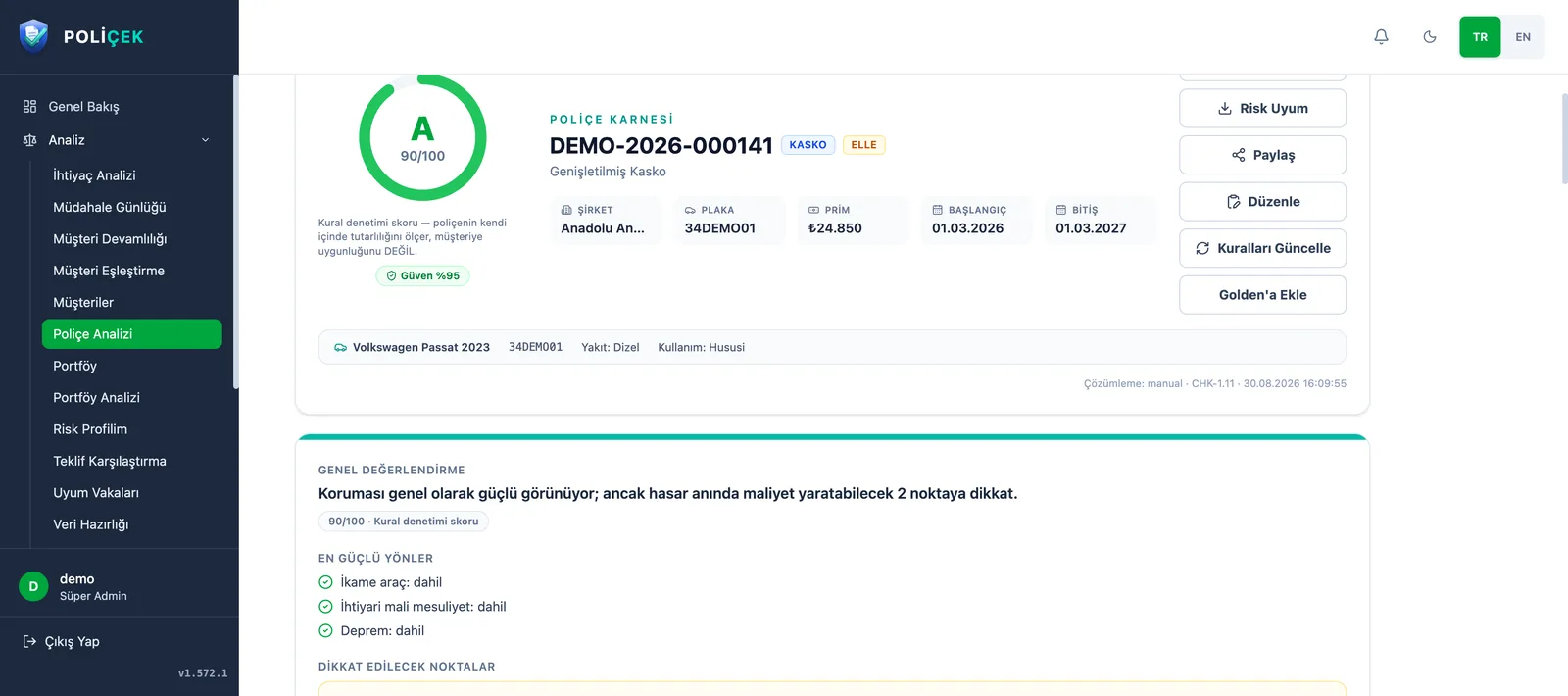
Policy Report Card Sample data
POLİÇEK overall assessment screen: list of strengths, attention cards and recommended actions, with an evidence badge reading “written in your policy”.

The policy’s strengths, the points to watch and concrete next steps. Under every card sits the place in your policy where the clause is written — the engine shows the document’s sentence, not its own.

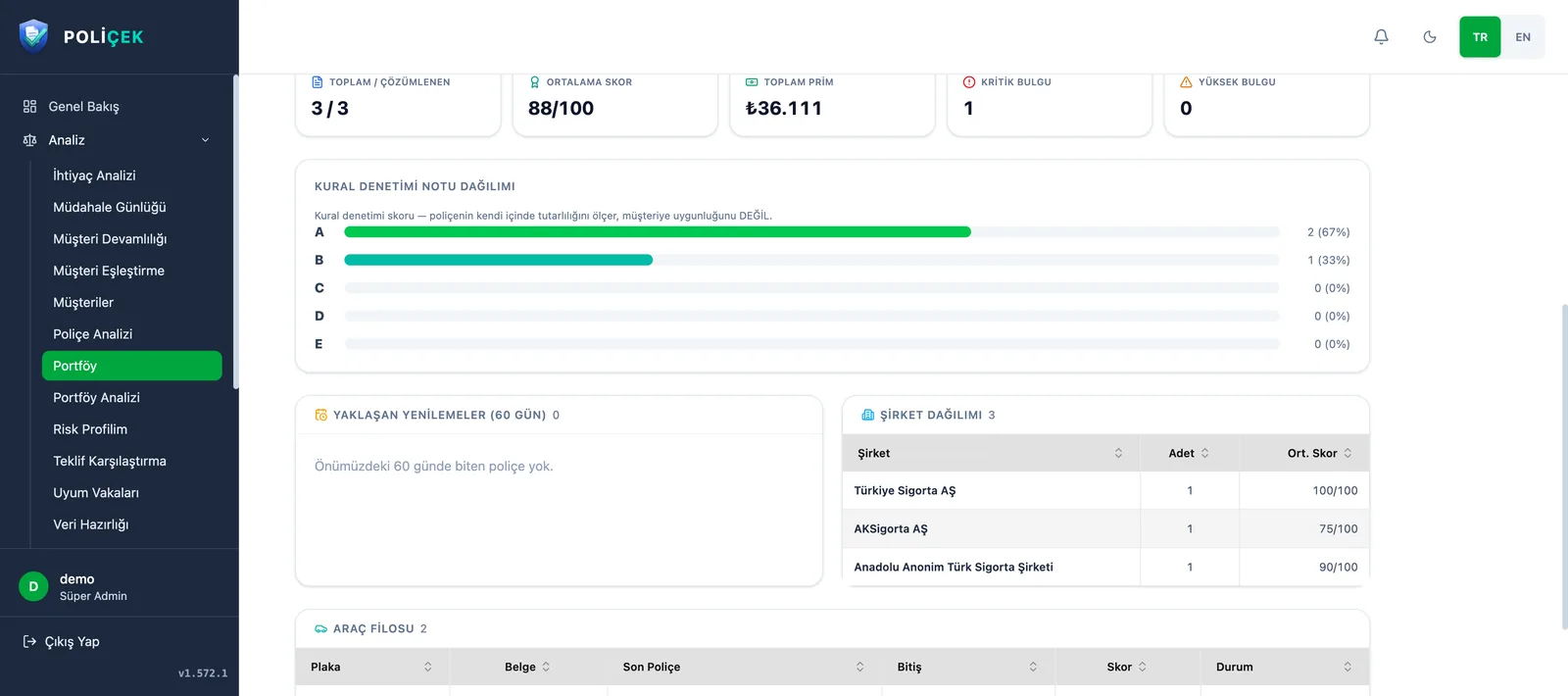
Portfolio Sample data
POLİÇEK portfolio screen: counters for total policies, average score, total premium and critical findings, plus the rule-audit grade distribution.

A consolidated view for agencies, brokers and companies running many policies: score distribution, total premium, critical findings and upcoming renewals on one screen.

Where we stand

What we refuse to do matters as much as what we do.

These three sentences are not a marketing promise; they are constraints the engine obeys, each with a counterpart in the code.

  • No insurer is ever recommended.

    POLİÇEK compares; it does not sell. No output steers you towards a company, a product or an agency. Neutrality is not a preference here — it is the definition of the product.

  • Every finding names its source.

    Behind a line stands either your own policy, or the official general terms it refers to, or the expert catalogue. Which one it is appears on the card itself — “your policy says this” and “this may generally apply” are not the same claim.

  • Not found does not mean not there.

    When the engine cannot read a field it leaves it empty and says so. It does not invent a reason the document never states, does not display a ratio it could not measure, and does not present an uncertain line as a certainty.

If you already have an account, pick up where you left off.

POLİÇEK accounts are created by invitation. If you need access for your organisation, speak to the administrator who opens accounts for you.

Cookie preferences

Strictly necessary records cannot be switched off, because the page will not work safely without them and the cookieless counter stores no personal data. The only optional item is your raw IP address and browser signature; while it is off, neither field is ever written.

Strictly necessary

The form's bot protection and remembering your choice in this panel. Cannot be disabled.

Always on

Detailed visit record

Turn this on and your visit record will also carry your raw IP address and browser signature. Page counting is independent of this switch and works without cookies; with it off you are still counted, but your identity is only a digest that changes daily.

NO cookies in this category — a server-side record only